|
|
 |
|
 |
 |
PRO/Lite |
| [Released Date : 19 August
2007] |
Program description
Store your's music CD's on the computer as WMA, MP3, Ogg, APE, Flac or WAV file!
Easy Rip is a program for Windows that lets you easely extract digital audio tracks from audio CDs directly into either Wave (.wav), Windows Media (.wma), MPEG Layer-3 (.mp3), OGG (.ogg), APE (.ape) or FLAC (.flac) files on your hard drive.
By using direct digital extraction, pure audio quality is maintained.
Can optionally download Album and Track information from the Internet.
Easy Rip PRO extra features:
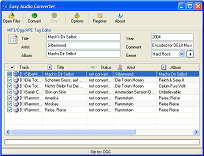
- Fully functional Audio Converter
- MP3(IDv1, IDv2), OGG, APE - Tag Editor
- Fully functional CD Player
- Create PlayList
|


|
Features
- Supported audio formats: WMA-, MP3-, OGG- , APE, FLAC & Windows-WAV
- Excellent quality of CD extraction (ripping) and high ripping speed
- Supports album info editing (set audio tag - Album/Singer/Titel/Genre/Comment) to wma, mp3, ogg and ape files.
- Can optionally download Album, Singer and Track information from the Internet
- CD Preview
- Friendly and easy to use interface
Output Formats
Application use encoders that let you extract digital audio tracks from audio CDs directly into:
- WMA (Windows Media 9)
- MP3 (MPEG Layer-III) - Lame Codec 3.97
- OGG (OGG Vorbis)
- WAV
- APE
- FLAC
Audio tags support
For files that encoded into WMA, MP3, Ogg or Ape formats you can apply audio tags:
- Titel
- Singer
- Album
- Year
- Comment
- Genre
- Track number (set automaticaly)
Audio tags support fast all audio players(Media Player, WinAmp). You can use also LEPlayer. It support audio tag editing.
To set audio Tag do folowing:
- Select track in tracklist
- Specify fields you want to set (Title, Artist, Album...)
- Press "+" button
Useful Tip:
To set specified tag to all tracks just Specify it and then press column header on the tracklist
|
|
|  | |  |
|
|